
← Help · Seller: Business Suite
Download Your Transaction Records
Get everything you were paid in a date range as a spreadsheet or a CSV.
- 1
Open Your Store ▾ and choose Transaction Records.

- 2
The page opens on this calendar year. For other dates, enter From and To and choose Show.
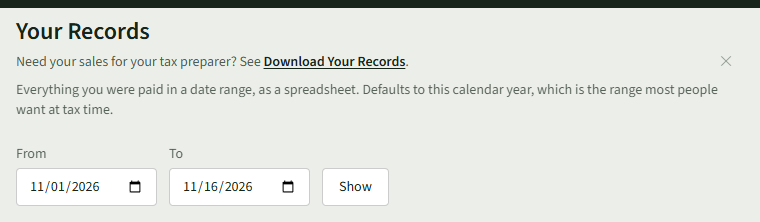
- 3
Check the figures: Orders, Membership Payments, Gross Sales, Platform Fee, Payment Processing Fees, Refunds, Net Proceeds and Sales by Category.
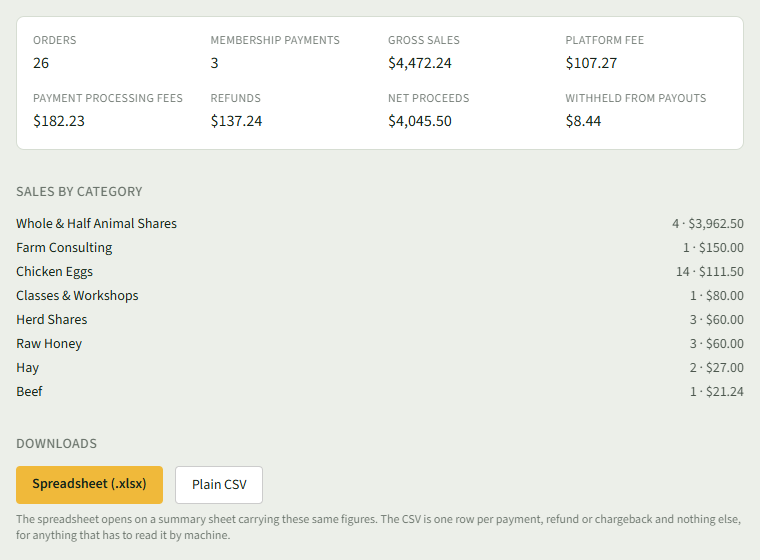
- 4
Under Downloads, choose Spreadsheet (.xlsx) or Plain CSV.
Good to Know
Transaction Records is open on every plan, Getting Going included; the spreadsheet opens on a summary sheet with the same figures.